
Reporters
Reporters in Rstest control how test results are displayed and processed.
You can use built-in reporters to get different output formats or create custom reporters to integrate with your workflow.
Using reporters
You can configure reporters through:
- CLI:
--reporters=<name>(can be used multiple times;--reporteris also accepted as an alias) - Config file: Add reporters to your
rstest.config.ts
More configuration options can be found in the Reporters Configuration documentation.
Reporter options for built-in reporters are defined in the TypeScript types: packages/core/src/types/reporter.ts
Built-in reporters
Rstest provides several built-in reporters:
Default reporter
The default reporter displays test run status, results, and summary information in your terminal with colored output.
Output example:
Configuration options:
summary: Whether to display summary information (default:true)logger: Custom logger function for output (default:process.stdout/process.stderr)
Progress reporting
The default reporter provides progress feedback during test execution, adapting to your environment.
TTY environments (interactive terminal)
In interactive terminals, the default reporter displays real-time test progress at the bottom of the terminal. This includes currently running test files and individual test cases that have been running for more than 2 seconds.
This live status updates every second and is automatically cleared when tests complete.
Non-TTY environments (CI, piped output, AI agents)
In non-TTY environments, the default reporter automatically logs a progress summary when there is no console output for 30 seconds. This prevents CI "no output" timeouts (e.g., GitHub Actions kills processes after 10 minutes of silence) and provides visibility into test execution without cluttering actively-producing output.
When a test case runs longer than 10 seconds, its name and elapsed time are shown. This helps identify stuck or slow tests. Progress reporting stops after 20 reports (~10 minutes of idle time) to avoid blocking CI timeout mechanisms when tests are truly stuck.
Verbose reporter
The verbose reporter extends the default reporter and outputs detailed information for all test cases, including successful ones. Features like progress reporting are also available. Use this when you need complete visibility into test execution.
Output example:
Dot reporter
The dot reporter emits a compact marker stream with one character per test case:
·for passed testsxfor failed tests-for skipped tests*for todo tests
It still prints the regular failing-test summary and duration footer after the marker line.
GitHub Actions reporter
Outputs error messages using GitHub Actions workflow commands when tests fail, enabling rich error annotations in your CI.
Auto-enablement: Automatically enabled in GitHub Actions environments.
When tests fail, the GitHub Actions reporter outputs information in a format similar to:
These outputs are parsed by GitHub Actions and generate comments at the corresponding locations.
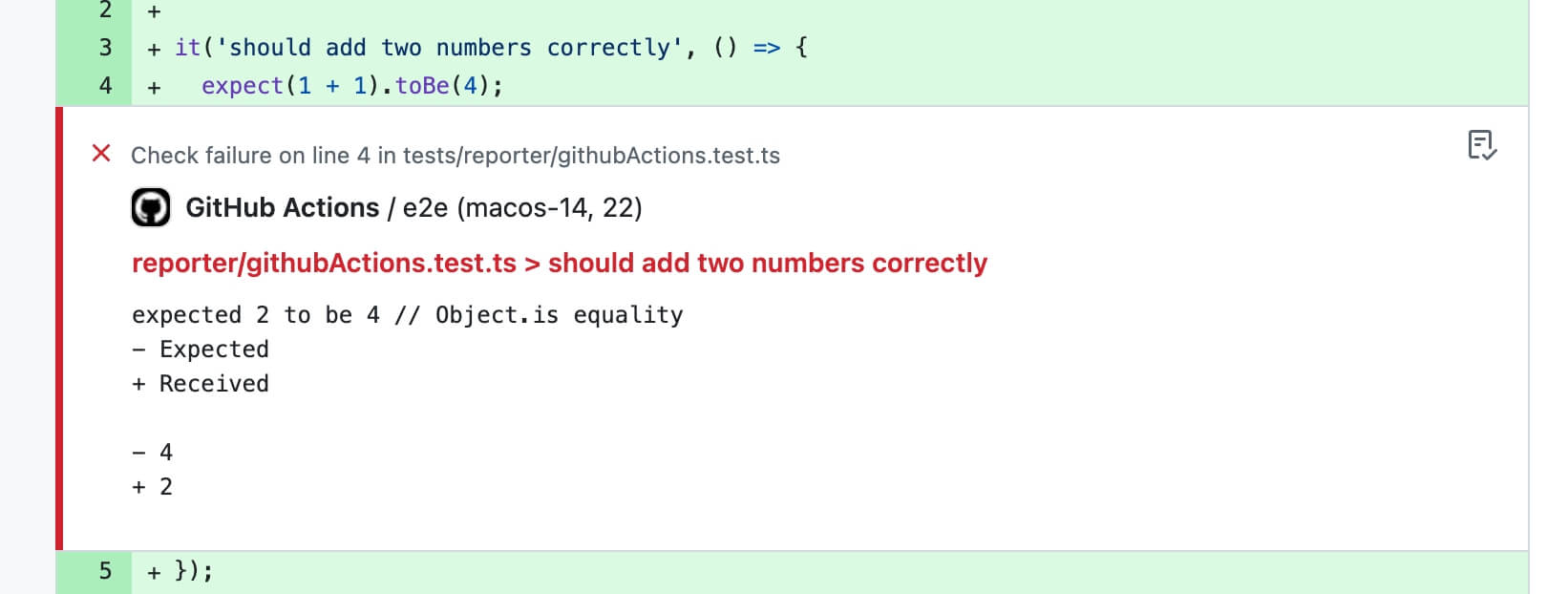
When GITHUB_STEP_SUMMARY is available (GitHub Actions sets this automatically), Rstest also appends a Markdown summary that includes:
- a test summary table (files/tests/duration)
- a flaky test section for tests that passed after retries, with short summaries of the previous failure messages when available
- failure sections with error message, diff, and stack trace
- repro commands for each failed test
- a status-marked report title (
✅/❌) - a collapsible block for each test run; successful runs are collapsed by default
Auto-enablement
When no reporter is manually set, Rstest automatically enables this reporter when it detects a GitHub Actions environment (process.env.GITHUB_ACTIONS is 'true').
Manual enablement
You can also manually enable this reporter:
Options
Use the object form of summary to customize the maximum characters included in each failure message and diff, and each unhandled error message and stack. maxCharsPerField defaults to 400. GitHub limits the whole Summary generated by one step to 1 MiB, so keep the configured value bounded. Set summary to false to disable the Markdown summary.
JUnit reporter
Generates test reports in JUnit XML format, perfect for CI/CD integration and test result aggregation.
Configuration options:
outputPath: Output file path (defaults to console output)
The JUnit reporter generates XML format as follows:
The JUnit reporter maps test case execution status to JUnit test status:
pass: Test passedfail: Test failed, generates<failure>tagskip: Test skipped, generates<skipped>tagtodo: Test todo, generates<skipped>tag
JSON reporter
Generates a stable JSON document for CI tooling, custom dashboards, or post-processing scripts.
Configuration options:
outputPath: Output file path (defaults to stdout)
Output shape:
status: Overall run status (passorfail)summary: Counts for files and testsdurationMs: Total, build, and test durations in millisecondssnapshot: Snapshot summary from the runfiles: Test-file level results with nested test casestests: Flattened test-case results, each withfullNameconsoleLogs: Captured user console output when availableunhandledErrors: Top-level unhandled errors when present
The JSON reporter writes relative testPath values so the output remains stable across different machines and CI workspaces.
Markdown reporter
The markdown reporter outputs a single markdown document to stdout, designed for agent / LLM consumption.
In agent environments, Rstest defaults to md only when you didn't explicitly configure reporters.
The default preset is normal, which is tuned for agent workflows:
- Each failure includes a repro command (
file+name) so an agent can rerun a single failing case. - Stack output defaults to
top(a stable anchor frame) instead of full stack frames. - Console output is enabled by default, but limited to keep the report size under control.
- When the number of failures exceeds
failures.max, the reporter prints a full failure list with minimal fields (repro / type / message / expected / actual), and only expands full details for the firstfailures.maxfailures.
The available presets mainly differ in how much detail they keep in failure sections:
All presets still keep the same markdown structure. The main difference is how much failure context is expanded by default.
The default output always starts with a report title, then shows a summary section, test lists when needed, and a failures section.
When all tests pass, an excerpt looks like this:
When there are failures, an excerpt looks like this:
If you want a smaller payload for CI logs or multi-step agent loops, switch to the compact preset and lower the failure cap:
Blob reporter
The blob reporter serializes test results into JSON files for later merging. This is designed for use with test sharding in CI environments, where tests are split across multiple machines and results need to be combined afterward. Like sharding, it is not supported in watch mode.
Configuration options:
outputDir: Directory to store blob report files (default:.rstest-reports)
Blob files are saved to .rstest-reports/ by default. When coverage is enabled, each blob stores only the coverage collected during that run. With coverage providers that support deferred finalization, runs using the blob reporter do not generate coverage reports, add untested files from coverage.include, or check coverage thresholds. Runs without the blob reporter finalize coverage normally, including sharded runs. Older providers retain their existing per-run finalization behavior. After all blob-producing runs complete, use rstest merge-reports with coverage enabled to perform those steps once against the unified result. Coverage options passed only on a blob-producing run are not stored in the blob; keep finalization options in the configuration file or repeat them on merge-reports.
See splitting tests with shards for a complete CI workflow example.
Custom reporters
For advanced integration needs, you can create custom reporters by implementing the Reporter interface.
More details can be found in the Reporter API reference.